

-
-
-
Tổng tiền thanh toán:
-

Hướng dẫn lưu file .CSV vào SPIFFS / LittleFS ESP32
12/04/2026
Hướng dẫn lưu file .CSV vào SPIFFS / LittleFS ESP32
ESP32 có flash được chia thành nhiều vùng:
- App (code)
- OTA
- NVS
- SPIFFS / LittleFS ← vùng lưu file (csv của bạn)
Bước 1: Cài đặt trong tool:
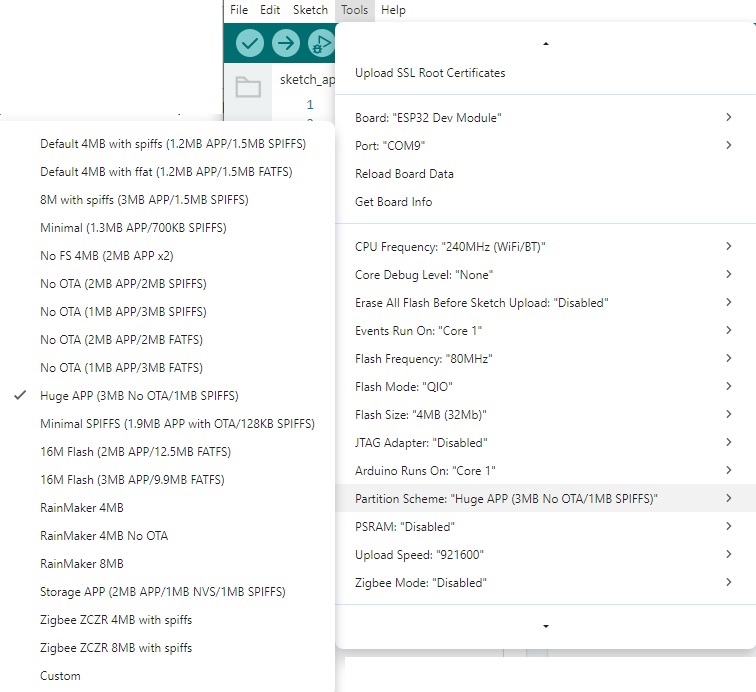
Trong Tools → Partition Scheme
Chọn 1 trong các cái có chữ SPIFFS:
👉 Khuyến nghị chọn cái này:
Huge APP (3MB No OTA/1MB SPIFFS)
Hoặc:
Default 4MB with spiffs (1.2MB APP/1.5MB SPIFFS)
Quan trọng: PHẢI có chữ SPIFFS
Dù bạn dùng LittleFS thì partition vẫn tên SPIFFS (do tương thích).
Bước 2 – test mount LittleFS
Code test nhanh:
#include "LittleFS.h"
void setup() {
Serial.begin(115200);
if(!LittleFS.begin(true)){
Serial.println("Mount Failed");
return;
}
Serial.println("LittleFS OK");
}
void loop(){}
Nếu thấy: LittleFS OK
=> Done.
Bước 3: Viết file CSV chuẩn trên ESP32 (append dữ liệu)
Đây là mẫu chuẩn dùng thực tế cho log sensor.
1️⃣ Code đầy đủ
#include "LittleFS.h"
#define FILE_CSV "/log.csv"
void writeHeaderIfNeeded()
{
if(!LittleFS.exists(FILE_CSV))
{
File file = LittleFS.open(FILE_CSV, "w");
file.println("Time,Temperature,Humidity");
file.close();
Serial.println("Created new CSV file");
}
}
void appendCSV(float temp, float hum)
{
File file = LittleFS.open(FILE_CSV, "a"); // append
if(!file){
Serial.println("Open file failed");
return;
}
unsigned long t = millis()/1000;
file.printf("%lu,%.2f,%.2f\n", t, temp, hum);
file.close();
Serial.println("Saved to CSV");
}
void setup()
{
Serial.begin(115200);
if(!LittleFS.begin(true)){
Serial.println("LittleFS Mount Failed");
return;
}
writeHeaderIfNeeded();
}
void loop()
{
float temp = random(250,350)/10.0; // demo
float hum = random(400,700)/10.0;
appendCSV(temp, hum);
delay(5000);
}
File CSV sẽ trông như này
Time,Temperature,Humidity
5,27.40,61.20
10,27.80,60.90
15,28.10,60.10
Mở bằng Excel OK luôn.